Hillcrest Elementary School |
|
|
|
Week of September 14, 2026 |
|
|
PTO FUNDRAISER DUE SEPTEMBER 16: |
Nominate a Crestwood Teacher for Michigan Teacher of the Year! |
Crestwood School District is fortunate to have dedicated educators who inspire, support, and make a difference for our students every day. Now is your opportunity to help one of those outstanding teachers receive statewide recognition! The Michigan Department of Education is accepting nominations for the 2027–2028 Michigan Teacher of the Year. The program recognizes exceptional educators from across Michigan and provides opportunities for selected Regional Teachers of the Year to represent educators, share their expertise, and provide input on educational policies and initiatives at the state level.
Anyone can nominate an outstanding teacher. The nomination form asks for the teacher’s name, email address, district and school, grade level, your contact information, and a short paragraph describing why you believe the teacher deserves this recognition.
Eligible nominees must hold a valid Michigan teaching certificate, teach students in PreK–12, work directly with students in their current role, and have completed at least five years of teaching experience in Michigan. Teachers cannot nominate themselves. The deadline to submit a nomination is Wednesday, September 23, 2026, at 11:59 p.m.
We encourage our families, students, staff, alumni, and community members to take a few minutes to recognize a Crestwood educator who has made a meaningful impact. Let’s make sure Michigan knows about the incredible teachers we have right here in Crestwood!
Nominate a Teacher for Michigan Teacher of the Year |
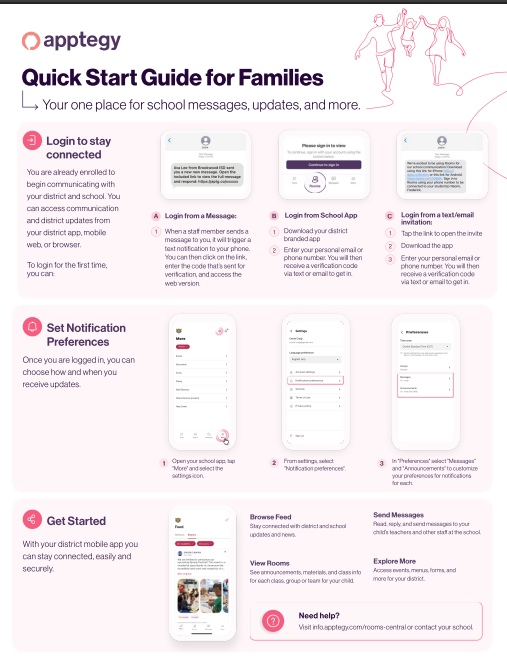
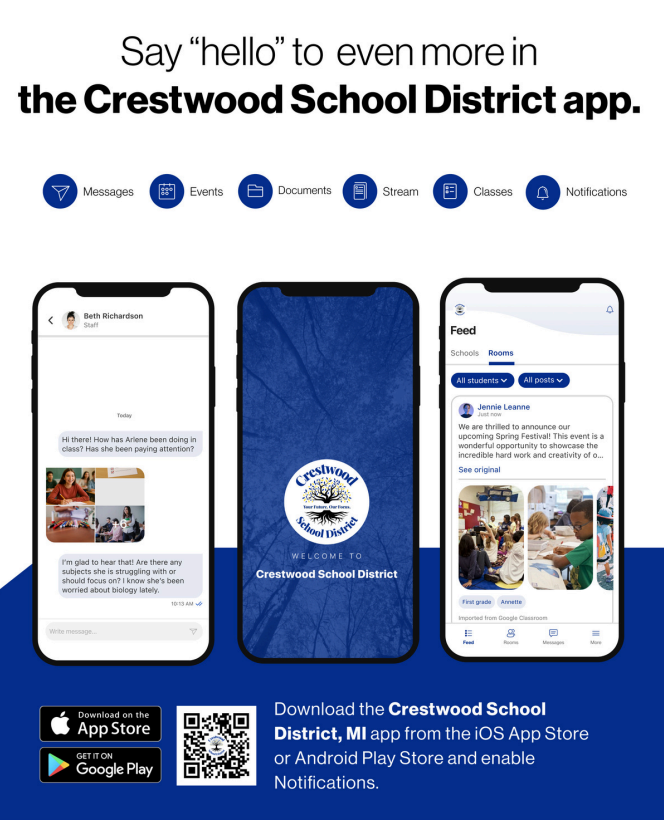
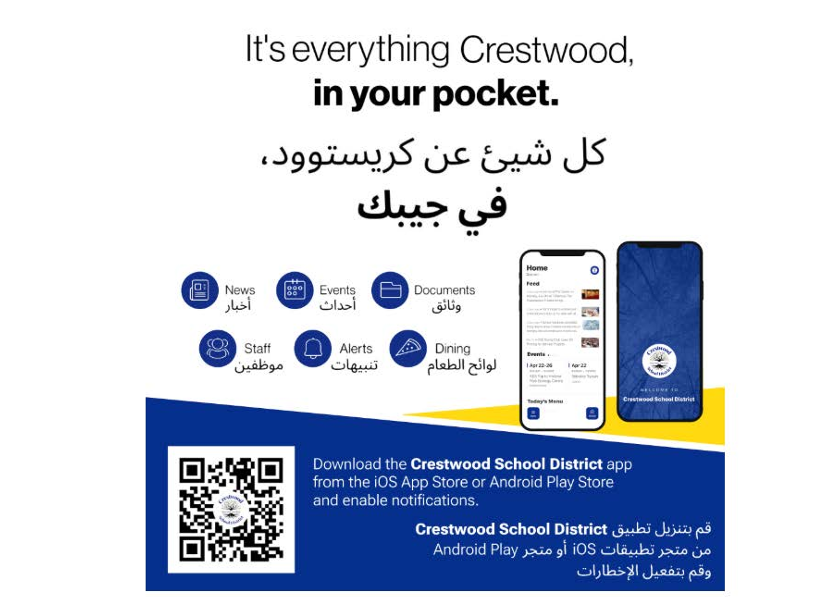
ALL COMMUNICATION WILL GO THROUGH APPTEGY THIS SCHOOL YEAR! THE FOLLOWING IS HOW YOU CAN DOWNLOAD THE APP: |
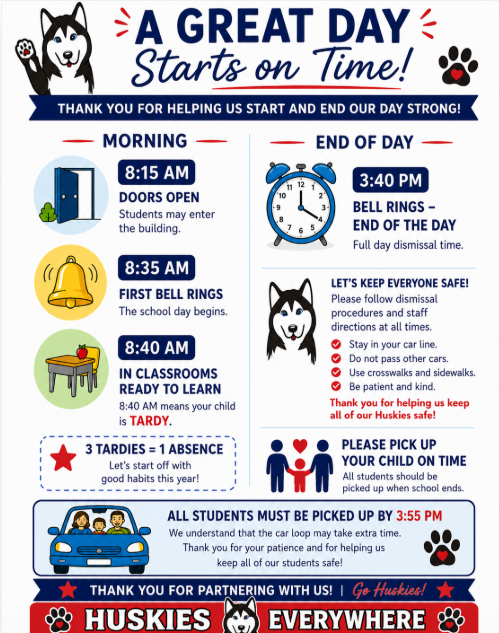
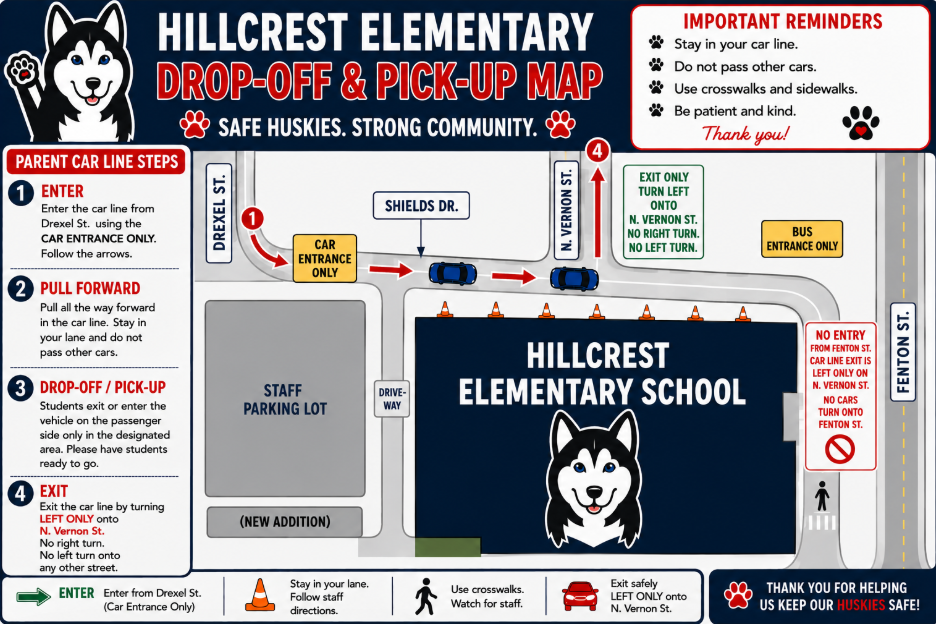
GUIDELINES FOR PICK-UP AND DROP-OFF CARLINE: |
Message from Principal--Mrs. Saad |
|
|
PARENT Connection PORTAL
If you have not done so already, please download the PARENT CONNECTION APP and get to the parent portal for updating your child(s) information. You are welcome to call the main office at Hillcrest (313) 278-0425 to get support if needed! IREADY TESTING 📚 Upcoming i-Ready Assessments 🧮 Hillcrest Families, Over the next couple of weeks, we will begin testing your child in i-Ready Reading and i-Ready Math. 💻 This computer-based assessment helps our teachers understand your child's current learning level so we can best support them in mastering their grade-level standards this year! 🌟
Thank you for your support as we partner together for your child's success! 🎓 ⏰ Every Minute Matters! Early Dismissal Reminders ⏰ We want to gently remind everyone that "Every Minute Matters" when it comes to your child's education! 🎒
Students thrive on their daily classroom routines and schedules. When a child is picked up early, it disrupts their learning momentum and makes it challenging for both the student and teacher to prepare for dismissal. Let’s work together this school year to keep our students in school for the full day! 🏫✨ Important Guidelines for Early Pick-Ups:
📞 Call Before Noon: If an early pick-up is unavoidable, please call the main office before 12:00 PM. This gives our staff and teachers time to gather your child's belongings without interrupting class time. 🕒 School Hours: Please refer to our newsletter or school website for our full daily schedule.
We truly appreciate your cooperation in keeping early dismissals to a minimum this year! Thank you for partnering with us for your child’s success. 💙 |
Update Contact Information with Back to School Check-In: |
In order to make sure that you are updated on the latest school information and your child’s progress, all parents/guardians are required to complete the back to school registration in MiStar prior to the first day of school for each student in the household. This ensures that we have the most up to date information regarding your student. All school communications are sent home electronically. It is important that we have up to date information to communicate with parents and guardians. Parents are asked to go to their MiStar Parent Connection account through the MiStar Parent Portal MiStar Parent Portal. Be sure to complete all check-in steps.
Completing the back to school check-in is best done on a desktop or tablet, not a phone. If you do not have a computer, you can stop by the Crestwood Board Office (1045 N. Gulley) Monday-Thursday from 9 AM - 2 PM. There are Chromebooks ready for you to register your student in our lobby. Need help? Please watch a step-by-step video in your preferred language.
English: https://5il.co/3k3nb
Arabic: https://5il.co/3k3na
Please ensure your child/student is aware of their MiStar Student Connection Username and password. Please keep your MiStar Parent Connect password a secret from your student. If you forgot your Parent Connect pin or password, you can reset it from the MiStar Portal. The red circled area resets your pin and the purple circled area resets your password.
If you need additional assistance with your MiStar Parent Connection Login, please email any of our Secretaries-- Phone (313) 278-0425, Mrs. Chehab--Administrative Assistant, Email-- nchehab@csdmi.org
|
|
|
New Family Communication - Connect |
We’re excited to roll out a new tool that will simplify how we communicate with you. Connect, built right into our Crestwood School District app and website, offer secure and safe two-way messaging. This addition allows our district to bring the community closer together. From messages to educators, to events, to lunch menus, and more - everything can now live in one place.
Download the Crestwood School District app:
Android
iPhone Why Connect? |
- One place for every message.
-
No more juggling multiple communication apps, flipping between inboxes, or remembering different logins.
- Text notifications. You can get notified automatically of new messages even if you haven’t downloaded our district app.
- Safe and secure. Built-in moderation and other safety tools allow us to ensure safety of all communications, at all times.
|
What to Expect:
Connect will become our primary method of communication for all interactions between staff, coaches, families, and teachers. You may receive a text notification from 27806. The text will let you know who sent you a message in the Connect platform; you can then click the link for web access or view the message via the Crestwood School District app. It will be important that you go ahead and login to your account and familiarize yourself with the platform so we are ready to go for this school year.
Options to access Connect: |
- When a staff member sends a message to you in Connect, it will trigger a text notification to your phone. You can then click on the link, have it send you a verification code to access the web version.
- Login from a text/email invitation
- Tap the link to open the invite
- Download the app
- Enter your personal email or phone number. You will then receive a verification code via text or email to get in.
-
Download the Crestwood School District app - Enter your personal email or phone number. You will then receive a verification code via text or email to get in.
- The first time you open the app, it will ask to send you push notifications. Select Allow to get important announcements from your teachers within the classroom.
-
Select the Rooms and Messages tab at the bottom of the app so you can start engaging with teachers via Messages and Classes!
- Messages is two way communication where you can respond to a staff/start conversations with a staff member.
- Rooms is where you’ll see your child’s virtual room(s).
|
If you have any issues getting logged in to the Crestwood School District app with your cell phone number or personal email address, please reach out to your student’s school. Click here for the Quick Start Guide for Families |
|
|
Message from Our Community Partners |
ASAP Community Coalition Newsletter
|
|
|
|
The ASAP Community Coalition had a busy August supporting healthier and safer communities through prevention education, outreach, training, and community events. Throughout the month, the team participated in school open houses, health fairs, community events, workshops, and trainings while providing substance use and tobacco prevention resources to more than 1,600 community members.
Check out the latest ASAP Community Coalition Newsletter to learn more about their prevention efforts, community outreach, August activities, and upcoming opportunities! |
|
|
| Keep these helpful links handy for quick access throughout the school year. |
|
|
Follow Us on Social Media! |
|
|
Crestwood School District
Social Media |
| |
|
Hillcrest Elementary School Social Media |
| |
|
|