Hillcrest Elementary School |
|
|
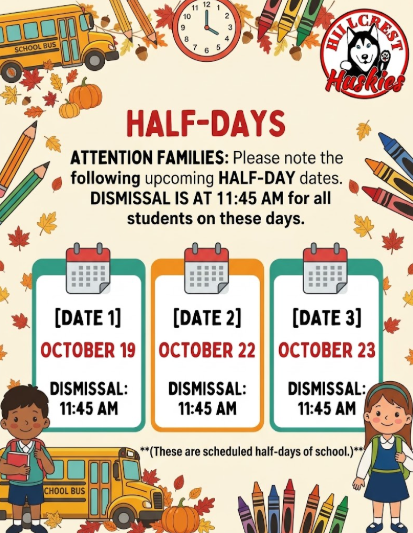
REMINDERS: ⏰ Monday, October 19
Half Day of School — Dismissal at 11:45 a.m. 👩🏫 Thursday, October 22
Half Day of School — Parent-Teacher Conferences
Dismissal at 11:45 a.m. 👩🏫 Friday, October 23
Half Day of School — Parent-Teacher Conferences
Dismissal at 11:45 a.m. Important Guidelines for Early Pick-Ups:
📞 Call Before Noon: If an early pick-up is unavoidable, please call the main office before 12:00 PM. This gives our staff and teachers time to gather your child's belongings without interrupting class time. 🕒 School Hours: Please refer to our newsletter or school website for our full daily schedule. |
|
|
| Parent-Teacher Conferences Announcement
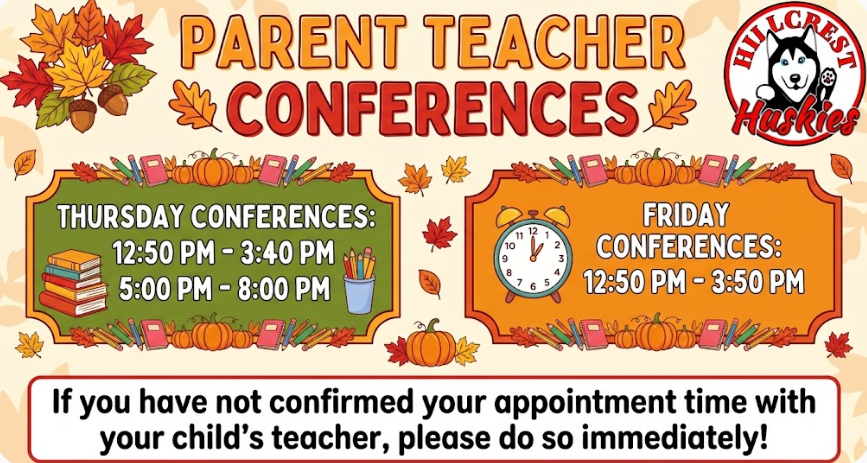
Join Us for Parent-Teacher Conferences! Parent-Teacher Conferences are right around the corner! This is a wonderful opportunity to connect with your child's teacher, discuss their academic progress, and celebrate their growth so far this school year. 📅 CONFERENCE SCHEDULE Thursday: 12:50 PM – 3:40 PM & 5:00 PM – 8:00 PM
Friday: 12:50 PM – 3:50 PM ⚠️ IMPORTANT REMINDER: If you have not yet confirmed your scheduled conference time, please contact your child's teacher immediately to secure your spot. We look forward to partnering with you for your child's success! |
|
|
🎃 TEACHER PUMPKIN RAFFLE! 🎃 |
Win a One-of-a-Kind Pumpkin Designed by Your Favorite Teachers! 🎟️ TICKETS ARE JUST $1 EACH! 🎟️
Support our school and take home a spooky, hilarious, or artistic masterpiece created by our talented teachers! 📅 RAFFLE DETAILS Ticket Sales: October 19th – October 23rd Where to Buy: Main Office
Winners Announced: End of the day on Friday, October 23rd ✨ HOW IT WORKS Bring your dollars to school October 19–23. Buy as many tickets as you want—$1 = 1 entry!
Listen closely to the end-of-day announcements on October 23rd to see if you won! Good luck, and thank you for participating! 🍁👻 |
Hillcrest Elementary Halloween Parade – Candy Donations Needed! |
|
|
|
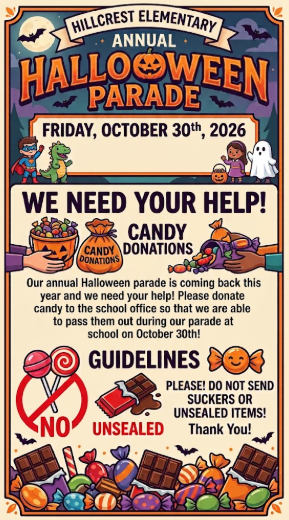
Hillcrest Elementary's Annual Halloween Parade is coming up on Friday, October 30, 2026, and we need your help to make it extra special for our students! We are asking families to donate candy to the school office so we can distribute treats to students during the parade. Candy Donation Guidelines:
All candy must be individually wrapped and unopened. No suckers or unsealed items, please! Thank you for helping us make this year's Halloween Parade a fun and memorable celebration for our Hillcrest students! |
|
|
| Hillcrest Family Movie Night!
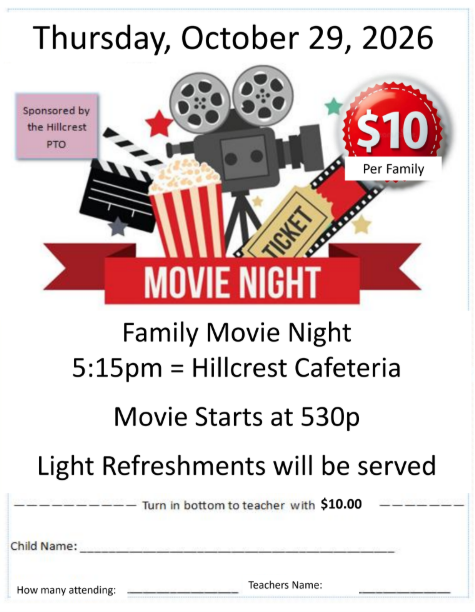
Get ready for an evening of community and fun! Join us in the Hillcrest Cafeteria on Thursday, October 29, 2026 for a Family Movie Night sponsored by the Hillcrest PTO. Doors will open at 5:15 PM, with the feature film beginning promptly at 5:30 PM. The cost is just $10 per family, and light refreshments will be provided.
To reserve your family’s place, please complete the registration form, which will be provided to your child on Monday, along with payment, to your child’s teacher. We can’t wait to see you there! |
|
|
PLEASE READ AND TALK WITH YOUR CHILD ABOUT BATHROOM USAGE! |
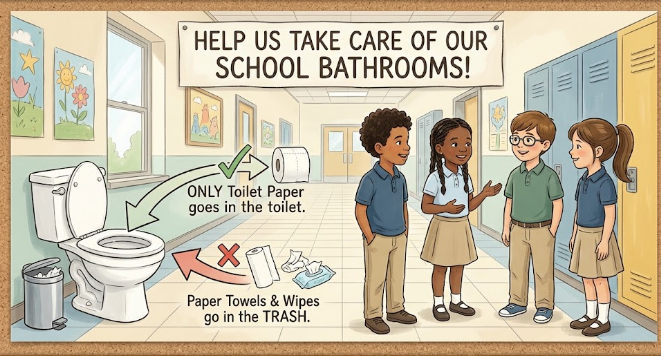
To keep our new restrooms clean, fully operational, and safe for all students, we are asking for your help in reinforcing proper bathroom etiquette with your child at home. Key Bathroom Rule to Remember: ONLY Toilet Paper in the Toilet: Toilet paper is the only item that should ever be flushed. NO Paper Towels or Baby Wipes in the Toilet: Paper towels, baby wipes (even those labeled "flushable"), and other hygiene items must always go into the trash bin.
Recently, non-flushable items like paper towels and wipes have caused clogs in our new plumbing system. Clogged restrooms lead to unnecessary disruptions during the school day and require emergency maintenance. How You Can Help at Home: Please take a few minutes to talk with your child about using the school bathrooms responsibly. Emphasize that:
They should flush only toilet paper. Paper towels and wipes belong strictly in the garbage can. Keeping the school bathrooms clean helps everyone have a pleasant environment. Thank you so much for your partnership and support in caring for our school facilities! |
|
|
Dear Husky Families, I am thrilled to announce that your child will begin to borrow books from the school Library! What to expect: With my support and the teachers, your child will make book choices based on their interests. Books will be checked out in school and due back one week from checkout. Books may be renewed if they need more time.
There are never overdue fines, but if a book is not returned in a timely manner, it may need to be replaced. I normally give a verbal notice to a child, a letter home, and then a phone call. They will be bringing their books home to share. Take time to read and talk over the story with them. Who were the characters? How did you like the story? What was your favorite part of the story? If a book gets damaged or lost, the book will need to be replaced at cost. Please encourage your child to take care of and enjoy their borrowed books. Once they have returned what they’ve borrowed, they are welcome to borrow more.
Please contact me with any other questions cmitera@csdmi.org 313-278-1702 Happy reading! Ms. Mitera Media Center Paraprofessional |
|
|
Scholastic Book Fair – October 19–23! |
|
|
|
| Get ready to discover some great books! Hillcrest Elementary's Scholastic Book Fair is coming October 19–23, 2026!
The Book Fair is a wonderful opportunity to encourage a love of reading while helping students discover exciting new stories, favorite authors, and books that spark their imaginations. Book Fair Details:
Dates: October 19–23, 2026
Location: Hillcrest Elementary School Library
Address: 7500 N. Vernon St., Dearborn Heights, MI 48127
We encourage our Hillcrest families to support the Book Fair and help inspire a lifelong love of reading in our students! Happy Reading, Hillcrest! |
|
|
BUS SAFETY AND BEHAVIOR REMINDERS |
|
|
Dear Parents and Guardians,
We are writing to you today to address serious and ongoing safety concerns on our school buses. Recently, we have experienced a persistent increase in students failing to follow basic safety rules and failing to listen to our bus drivers. Specifically, we are seeing repeated issues with: |
- Students screaming and excessive noise, which dangerously distracts the driver.
- Students moving around, standing up, or switching seats while the bus is in motion.
- Students openly ignoring and refusing to follow the direct instructions of the bus driver.
|
Parents, we need you to be aware: these behaviors mean your child is NOT being safe, and they are putting themselves, the driver, and every other student on the bus in danger. A school bus driver’s primary job is to navigate heavy traffic safely. They cannot focus on driving when they constantly have to manage dangerous student behavior behind them. Zero Tolerance & Bus Removal Consequences |
- We do not tolerate disruptive or unsafe conduct on the bus. Riding the bus is a privilege, not a right.
- Bus Referrals: If a student fails to listen to the driver or violates safety protocols, the driver will issue an official bus referral directly to the school office.
-
Removal from the Bus: If a referral is sent to the office, we will begin removing students from the bus due to their actions. Depending on the severity or repetition of the incident, this may result in an immediate temporary suspension or permanent removal of bus privileges.
|
- If your child is suspended or removed from the bus:
-
You will be fully responsible for arranging alternative daily transportation to and from school.
- School attendance remains mandatory. A bus suspension is not an excused absence, and your child is still required to be at school on time every day.
|
How You Can Help
We ask that every parent and guardian sit down with their child today to have a serious conversation about bus safety. Please remind them that:
|
- The bus driver is in charge, just like a classroom teacher.
- They must remain seated in their assigned seat at all times while the bus is moving.
- Inside voices are required—no shouting or screaming.
|
We appreciate your prompt attention to this matter and your immediate partnership in ensuring our buses are safe for everyone. Sincerely,
School Administration
Hillcrest Elementary School |
|
|
Access Your Student’s State Testing Results Through MiLearn
|
|
|
|
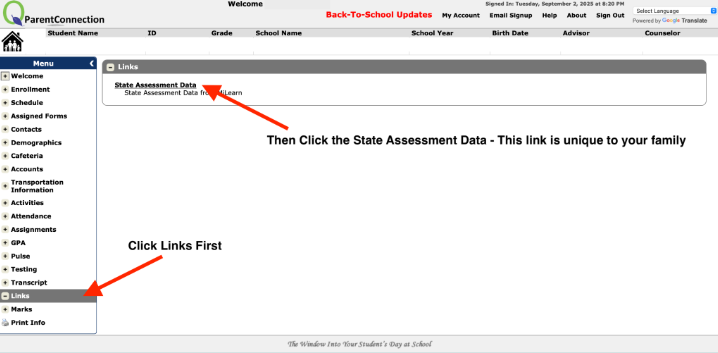
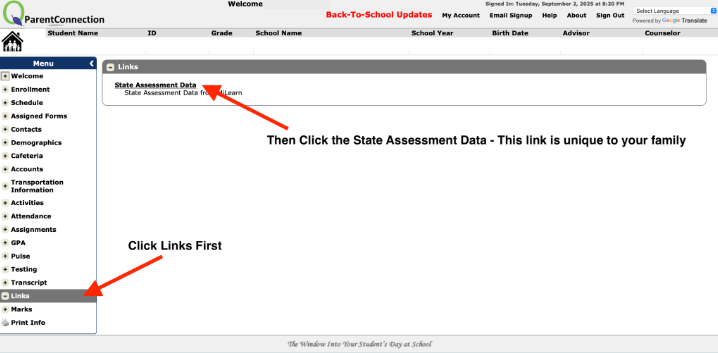
The Michigan Department of Education now provides families with easier access to state testing results through MiLearn (Michigan Linked Educational Assessment Reporting Network). Your student’s SAT and PSAT scores from the spring can be found here. Why it Matters:
Parent reports give you a clear picture of your child’s academic progress, showing strengths and areas for growth. Reviewing these results helps families work with teachers to set goals and support learning. Key Features of MiLearn: |
- Secure access to all state summative and benchmark assessments.
- Up to five years of test results available for your student.
- Reports provided in English, Spanish, and Arabic.
- Accessible directly through your district’s MiStar Parent Portal (no separate login required).
|
How to Access:
Log in to the MiStar Parent Portal using your existing account. Look for the State Assessment Data under links to view your child’s results. Taking time to review these reports will give you valuable insights into your child’s progress and help strengthen the school-home partnership to support student success. |
| |
A Great Day Starts on Time! |
|
|
|
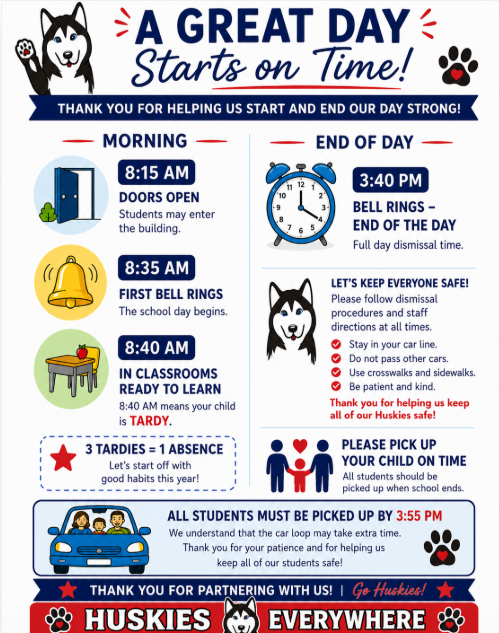
Starting and ending the school day on time helps our students build strong routines and ensures they are ready to learn each day. Doors open at 8:15 AM, the first bell rings at 8:35 AM, and students should be in their classrooms and ready to learn by 8:40 AM. Students arriving after 8:40 AM are considered tardy. Please remember that three tardies equal one absence.
The school day ends at 3:40 PM. Families should plan to arrive on time for dismissal, and all students must be picked up by 3:55 PM.
During dismissal, please help us keep everyone safe by staying in the car line, not passing other vehicles, using designated crosswalks and sidewalks, and following staff directions. We understand that the car loop may take a little extra time, and we appreciate your patience and cooperation. Thank you for partnering with us to help our Huskies start and end each day safely, successfully, and on time! |
|
|
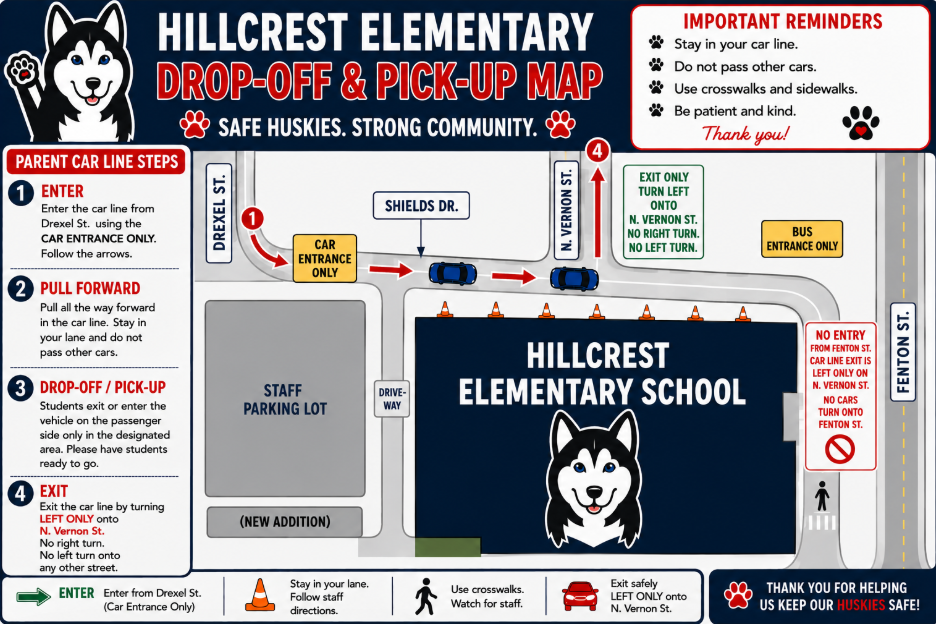
GUIDELINES FOR PICK-UP AND DROP-OFF CARLINE:
|
Keeping our Huskies safe during arrival and dismissal takes all of us! We ask all families using the parent car line to follow the designated traffic pattern and staff directions each day.
Families should enter the car line from Drexel Street and use the car entrance only. Once in the line, please pull all the way forward, stay in your lane, and do not pass other vehicles. Students should enter or exit the vehicle on the passenger side only and be ready to go to help keep the line moving safely and efficiently.
When exiting the car line, vehicles must turn left only onto North Vernon Street. There is no right turn and no left turn onto any other street. Please remember that the entrance from Fenton Street is for buses only and should not be used for parent drop-off or pick-up.
Thank you for being patient, using designated crosswalks and sidewalks, and following staff directions. Working together, we can keep arrival and dismissal safe for all of our Hillcrest Huskies! |
|
|
Fresh Fruit & Vegetable Program Coming to Hillcrest! |
|
|
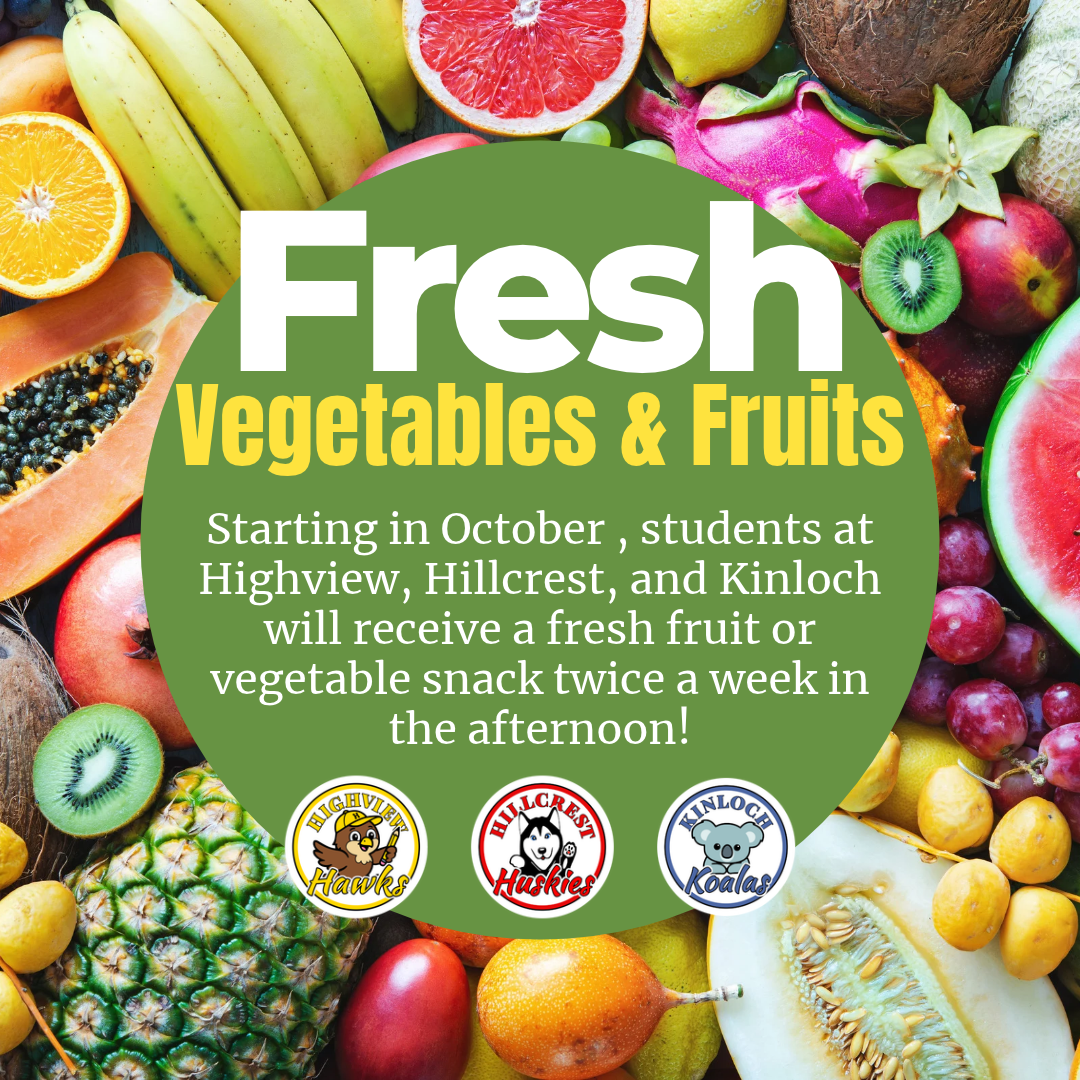
| We are excited to announce that Highview, Hillcrest, and Kinloch have been selected by the Michigan Department of Education to participate in the United States Department of Agriculture’s Fresh Fruit and Vegetable Program (FFVP). Beginning in October, students at these schools will receive a fresh fruit or vegetable snack twice a week during the early afternoon. The program is designed to create healthier school environments, introduce children to a greater variety of fruits and vegetables, increase fruit and vegetable consumption, and encourage healthy eating habits that can positively impact students now and in the future.
We are excited to provide our students with opportunities to try new foods, discover healthy choices, and build habits that support their health and learning! Families with questions can contact Food Services at (313) 278-0423. |
|
|
Education Benefits Form: Submit Yours Today! |
|
|
|
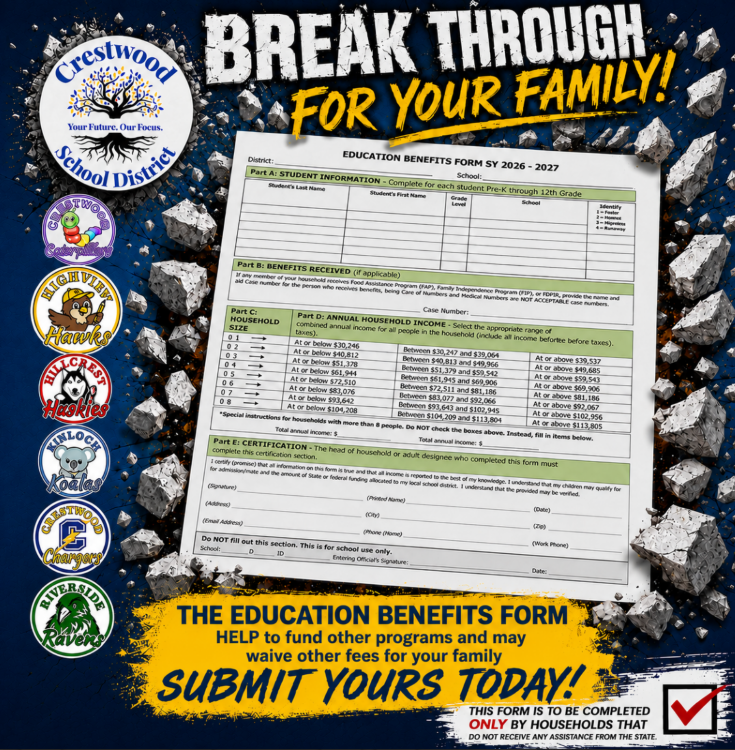
Crestwood School District families are encouraged to complete the 2026–2027 Education Benefits Form. Completing this form helps our district receive important federal funding that supports programs and services for our students and may also help waive certain fees for your family.
The form should be completed only by households that do not currently receive state assistance. Families will provide basic student and household information, including household size and annual household income, to determine eligibility.
Your participation makes a difference! Please complete and return your Education Benefits Form as soon as possible to help Crestwood School District continue providing valuable opportunities and resources for our students. |
|
|
Message from Principal--Mrs. Saad |
|
|
PARENT Connection PORTAL
If you have not done so already, please download the PARENT CONNECTION APP and get to the parent portal for updating your child(s) information. You are welcome to call the main office at Hillcrest (313) 278-0425 to get support if needed!
⏰ Every Minute Matters! Early Dismissal Reminders ⏰ We want to gently remind everyone that "Every Minute Matters" when it comes to your child's education! 🎒
Students thrive on their daily classroom routines and schedules. When a child is picked up early, it disrupts their learning momentum and makes it challenging for both the student and teacher to prepare for dismissal. Let’s work together this school year to keep our students in school for the full day! 🏫✨
Important Guidelines for Early Pick-Ups: 📞 Call Before Noon: If an early pick-up is unavoidable, please call the main office before 12:00 PM. This gives our staff and teachers time to gather your child's belongings without interrupting class time. 🕒 School Hours: Please refer to our newsletter or school website for our full daily schedule. We truly appreciate your cooperation in keeping early dismissals to a minimum this year! Thank you for partnering with us for your child’s success. 💙
|
|
|
Family Fun! Trunk or Treat & Haunted Mini Golf |
| |
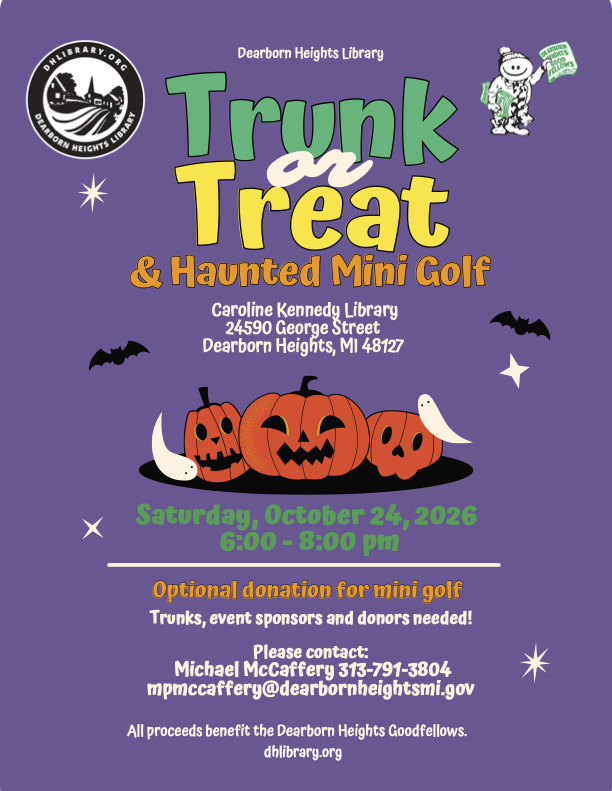
Looking for a fun way to celebrate Halloween with your family? The Dearborn Heights Library is hosting a Trunk or Treat & Haunted Mini Golf event on Saturday, October 24, 2026, from 6:00–8:00 PM at the Caroline Kennedy Library, located at 24590 George Street in Dearborn Heights.
Families are invited to enjoy an evening of Halloween festivities while supporting the Dearborn Heights Goodfellows. Optional donations will be accepted for mini golf, with all proceeds benefiting the organization.
Community participation is welcome! The library is also looking for trunks, event sponsors, and donors. Anyone interested in participating or supporting the event can contact Michael McCaffery at 313-791-3804 or mpmccaffery@dearbornheightsmi.gov.
For more information, visit dhlibrary.org or see the attached flyer. |
| |
|
Join Us for a Halloween Family Game Night - 10/27 |
|
|
|
|
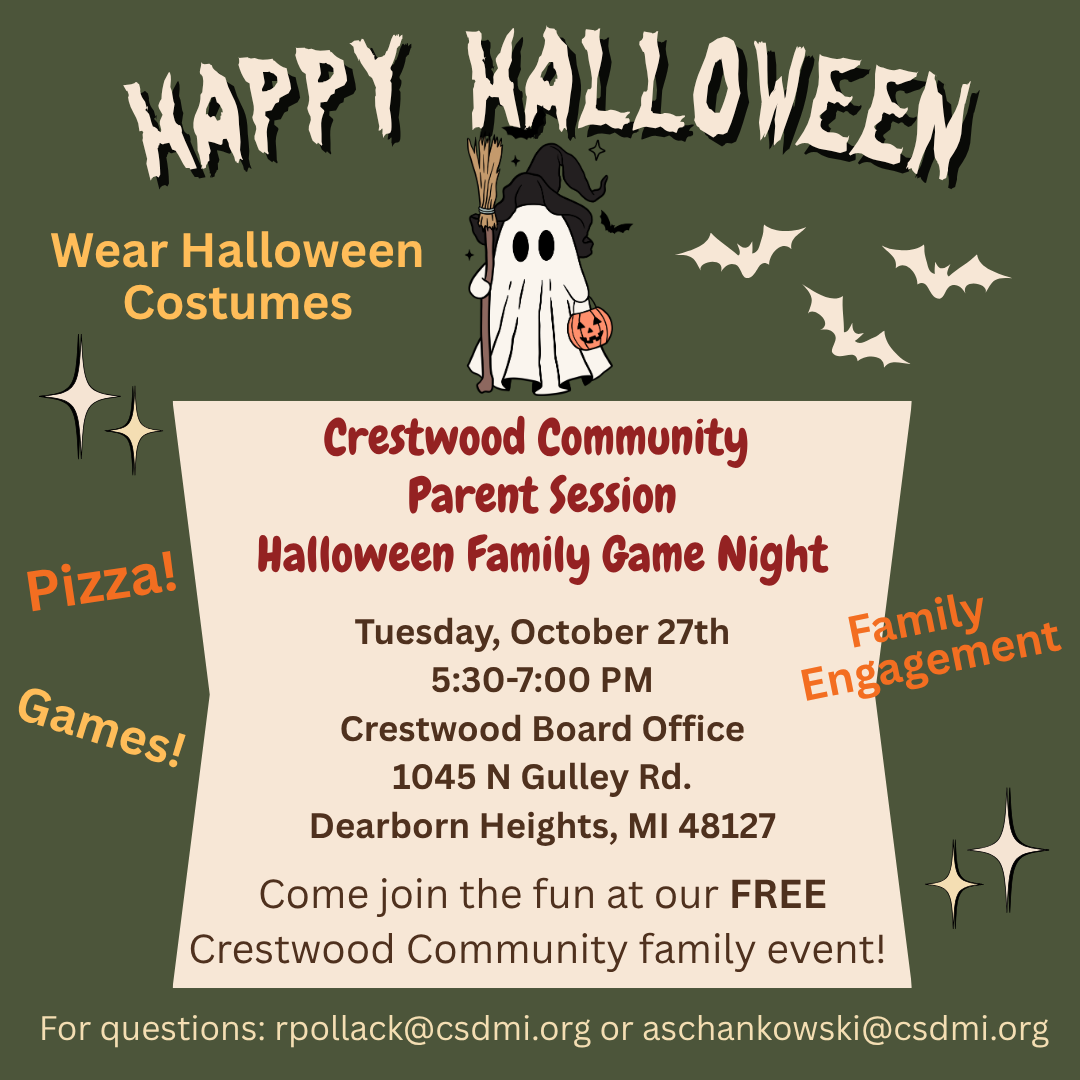
Get ready for an evening of Halloween fun! Crestwood School District invites all families to attend our FREE Crestwood Community Parent Session: Halloween Family Game Night on Tuesday, October 27th, from 5:30–7:00 PM at the Crestwood Board Office.
This family-friendly event is a wonderful opportunity to spend quality time together, connect with other Crestwood families, and strengthen our school community. Families can look forward to games, pizza, and plenty of Halloween fun! Everyone is encouraged to wear their favorite Halloween costumes and join in the festivities. |
|
|
Event Details: Date: Tuesday, October 27, 2026
Time: 5:30–7:00 PM
Location: Crestwood Board Office, 1045 N. Gulley Rd., Dearborn Heights, MI 48127
Cost: FREE for Crestwood families! We value the important partnership between our schools and families, and events like this provide opportunities to come together, build relationships, and create lasting memories.
For questions, please contact rpollack@csdmi.org or aschankowski@csdmi.org. We hope you and your family will join us for a spooktacular evening of fun and community connection! |
|
|
Update Contact Information with Back to School Check-In: |
In order to make sure that you are updated on the latest school information and your child’s progress, all parents/guardians are required to complete the back to school registration in MiStar prior to the first day of school for each student in the household. This ensures that we have the most up to date information regarding your student. All school communications are sent home electronically. It is important that we have up to date information to communicate with parents and guardians. Parents are asked to go to their MiStar Parent Connection account through the MiStar Parent Portal MiStar Parent Portal. Be sure to complete all check-in steps.
Completing the back to school check-in is best done on a desktop or tablet, not a phone. If you do not have a computer, you can stop by the Crestwood Board Office (1045 N. Gulley) Monday-Thursday from 9 AM - 2 PM. There are Chromebooks ready for you to register your student in our lobby. Need help? Please watch a step-by-step video in your preferred language. English: https://5il.co/3k3nb
Arabic: https://5il.co/3k3na
Please ensure your child/student is aware of their MiStar Student Connection Username and password. Please keep your MiStar Parent Connect password a secret from your student.
If you forgot your Parent Connect pin or password, you can reset it from the MiStar Portal. The red circled area resets your pin and the purple circled area resets your password.
If you need additional assistance with your MiStar Parent Connection Login, please email any of our Secretaries-- Phone (313) 278-0425, Mrs. Chehab--Administrative Assistant, Email-- nchehab@csdmi.org
|
| |
New Family Communication - Connect |
We’re excited to roll out a new tool that will simplify how we communicate with you. Connect, built right into our Crestwood School District app and website, offer secure and safe two-way messaging.
This addition allows our district to bring the community closer together. From messages to educators, to events, to lunch menus, and more - everything can now live in one place. Download the Crestwood School District app:
Android
iPhone Why Connect?
|
- One place for every message.
- No more juggling multiple communication apps, flipping between inboxes, or remembering different logins.
-
Text notifications. You can get notified automatically of new messages even if you haven’t downloaded our district app.
- Safe and secure. Built-in moderation and other safety tools allow us to ensure safety of all communications, at all times.
|
What to Expect:
Connect will become our primary method of communication for all interactions between staff, coaches, families, and teachers. You may receive a text notification from 27806. The text will let you know who sent you a message in the Connect platform; you can then click the link for web access or view the message via the Crestwood School District app. It will be important that you go ahead and login to your account and familiarize yourself with the platform so we are ready to go for this school year.
Options to access Connect: |
-
When a staff member sends a message to you in Connect, it will trigger a text notification to your phone. You can then click on the link, have it send you a verification code to access the web version.
- Login from a text/email invitation
- Tap the link to open the invite
- Download the app
- Enter your personal email or phone number. You will then receive a verification code via text or email to get in.
- Download the Crestwood School District app - Enter your personal email or phone number. You will then receive a verification code via text or email to get in.
-
The first time you open the app, it will ask to send you push notifications. Select Allow to get important announcements from your teachers within the classroom.
- Select the Rooms and Messages tab at the bottom of the app so you can start engaging with teachers via Messages and Classes!
-
Messages is two way communication where you can respond to a staff/start conversations with a staff member.
- Rooms is where you’ll see your child’s virtual room(s).
|
If you have any issues getting logged in to the Crestwood School District app with your cell phone number or personal email address, please reach out to your student’s school.
Click here for the Quick Start Guide for Families |
|
|
|
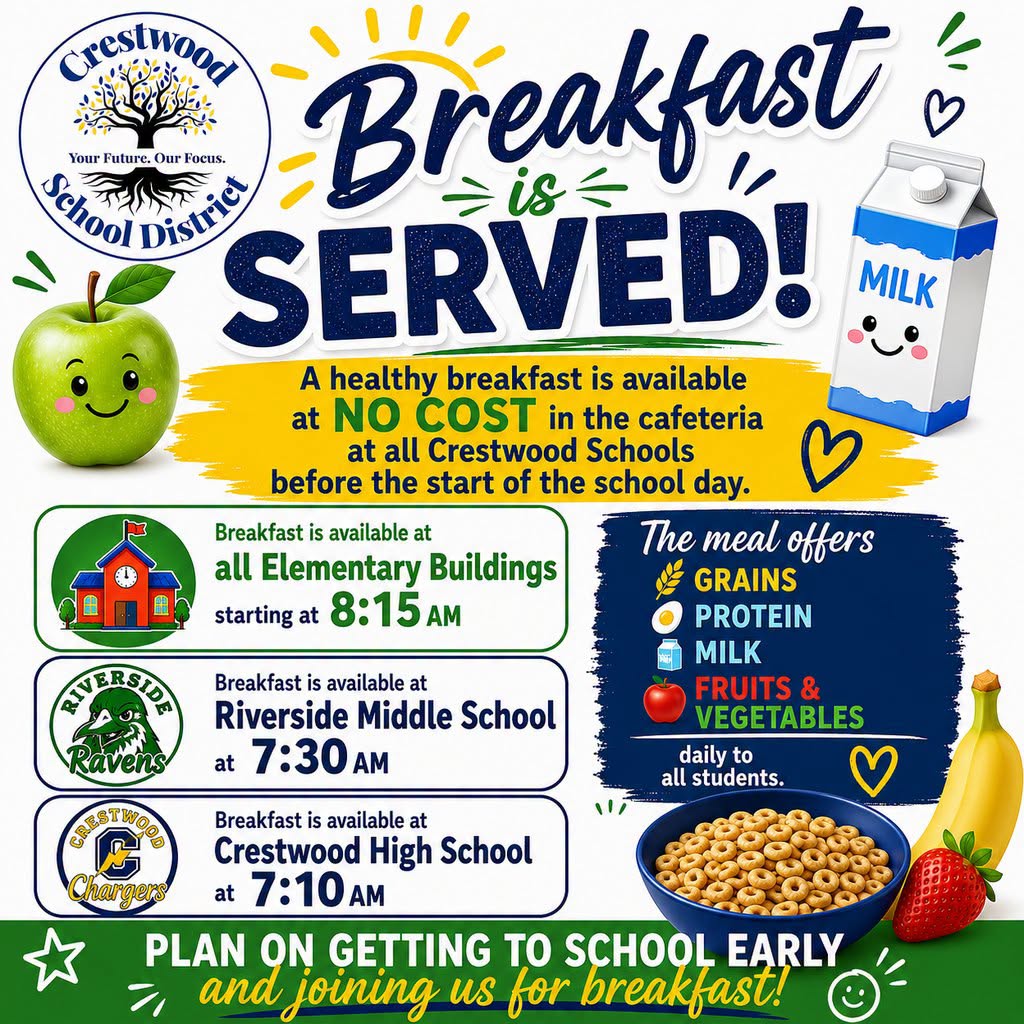
Help us ensure that our meal program is a success! Remind and encourage your child to take advantage of this opportunity and grab a school breakfast every single school day. |
|
|
Message from Our Community Partners |
|
|
Join us for the 6th Annual Trunk or Treat, hosted by KEY CLUB CHS!
When: October 28, 2026 | 5:00 PM – 6:00 PM Where: Crestwood Pick-Up Circle Bring your families for an evening of candy hosted by several of our student organizations, plus lots of fun games! We hope your families can join in on the fun. |
| |
|
ASAP Community Coalition Newsletter |
|
|
| Crestwood School District is pleased to share the September, 2026 ASAP Community Coalition Newsletter, highlighting the important work being done throughout our community to promote substance use prevention, mental health awareness, and family wellness. This month's newsletter features community outreach efforts, upcoming educational opportunities, free Naloxone training, and information about National Prescription Drug Take Back Day, which provides families with opportunities to safely dispose of unused or expired medications.
We're also excited to highlight the ASAP Community Coalition's partnership with the Crestwood High School Key Club for the upcoming Trunk or Treat event on October 28th, from 4:00–6:00 PM. Families are invited to stop by for treats and valuable resources focused on substance use prevention and wellness.
We encourage all Crestwood families to read the attached newsletter to learn more about these important initiatives, upcoming events, and resources available to support the health and well-being of our students, families, and community.
Together, we can continue building a healthier, safer, and more connected Crestwood community! |
|
|
Keep these helpful links handy for quick access throughout the school year. |
|
|
Follow Us on Social Media! |
|
|
Crestwood School District
Social Media |
| |
|
Hillcrest Elementary School Social Media |
| |
|
|